Proxy manager – antidetect browser with UDP proxy support
Picture every one of your accounts living in its own apartment, in its own city, at its own address. The Agent-X proxy manager gives your profiles exactly that – a dedicated IP and a believable location – so the only thing left to decide is how many accounts to launch today.
Get 5 free proxies right now
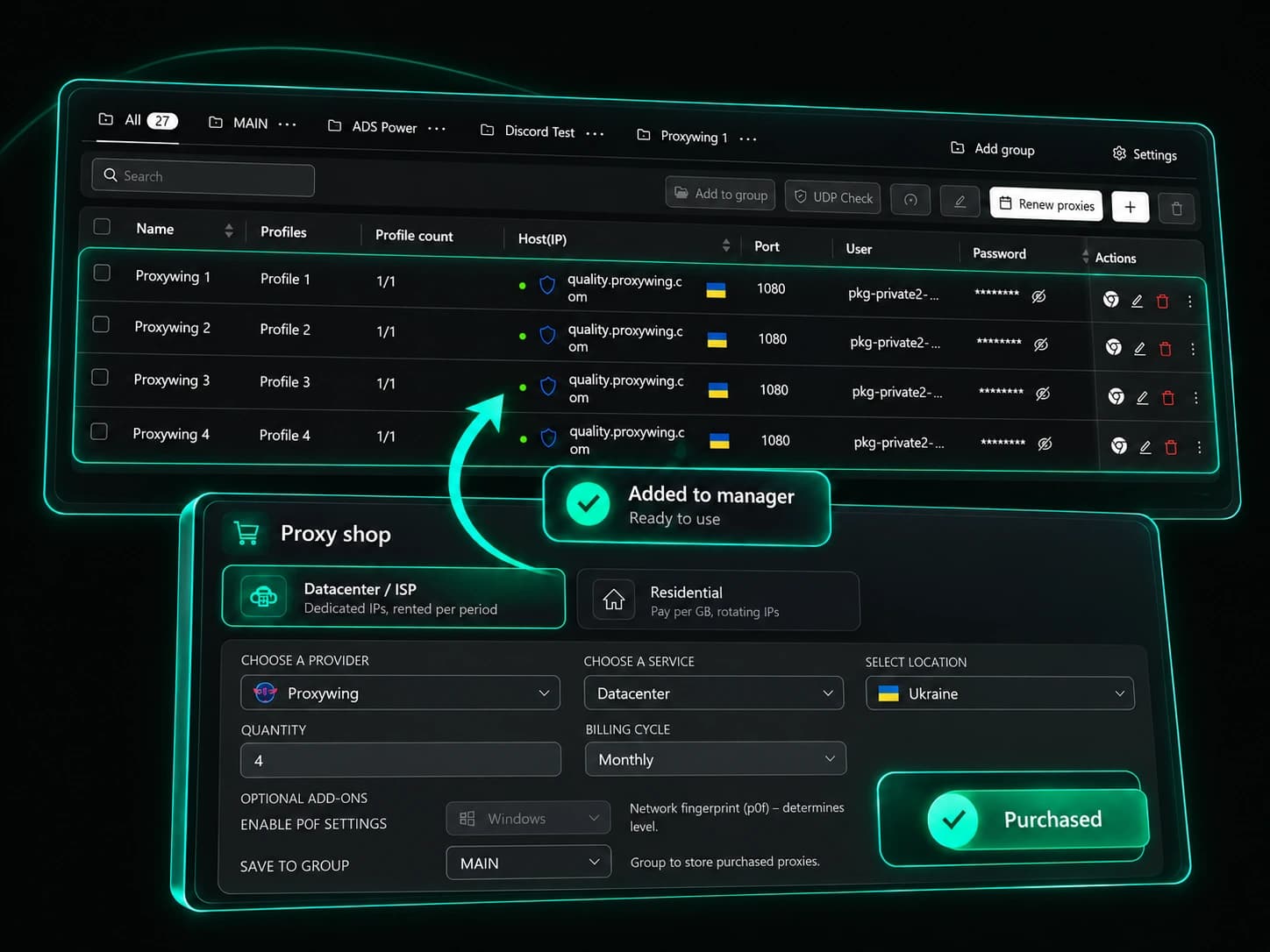
Antidetect browser proxies that keep accounts apart
A proxy is a middleman between your browser and a website – the site sees the proxy’s address instead of your home one. For multi-accounting this is essential, because even a flawless fingerprint won’t help when ten accounts log in from the same IP. A proxy set at the system level or through an extension won’t save you either – it is shared by every tab and does nothing to keep accounts apart. Agent-X binds a proxy to each profile separately, so every account goes online from its own address and looks like a different person.
An address of its own
Profiles never overlap by IP, which leaves a platform nothing to hold on to when it tries to link your accounts.
Location that matches
Time zone, geolocation and language follow the proxy’s country – a Berlin account will never wake up in Singapore.
Proxies next to profiles
Store, group and hand out addresses in the same place where you manage accounts – no third-party tools or spreadsheets.


UDP proxy support – WebRTC and DNS without leaks
Many antidetect browsers send only regular web traffic through the proxy and let everything else bypass it. When your SOCKS5 proxy supports UDP, Agent-X routes that traffic through it as well, so WebRTC behaves naturally without exposing your real IP, and DNS requests match the proxy’s network.
UDP test up front
Find out whether a given proxy can carry UDP before you bind it to profiles, and put only the capable ones to work.
WebRTC on your terms
Set WebRTC to follow the proxy or switch it off entirely – the choice is yours for each profile.
Results on one page
The checker page shows the exit IP, the state of WebRTC and DNS, and whether time zone and language match the address.

Bulk proxy import and checks in one pass
Your provider sent a hundred addresses in an unusual layout? Paste them into the manager as one block – Agent-X recognizes every line, shows you the result and checks the addresses before anything is saved.
Mixed lists welcome
HTTP and SOCKS5 written in different ways in one block are parsed without manual edits, and notes on each line are kept.
No duplicates
Repeats are filtered out at the preview stage, so the list stays tidy even after your tenth import.
Every detail in sight
Status, exit IP, country and city appear right after the check, and the rental end date reminds you to renew in time.
Bind proxies to browser profiles in bulk
Select the profiles you need, pick a proxy group, and Agent-X distributes the addresses on its own, giving each profile the next free one. The proxy list always shows how many accounts sit on each IP.
From the list or by hand
Pick a saved proxy for a profile or enter an address in its settings directly.
You set the limit
One IP per account or several profiles per address – you set the rule, and the distribution follows it.
Only live connections
Binding takes only working proxies, and bulk launch skips profiles whose address has stopped responding.


Buy residential, ISP and datacenter proxies in the app
No need to hunt for a new provider, sign up and move addresses around – the proxy store is built into Agent-X. Choose a type and country, pay from your balance topped up with crypto, and hand the purchase out to profiles.
Dedicated datacenter and ISP
Datacenter for a day or a month, ISP for a month – the IP is reserved for you and goes to no one else.
Residential by the gigabyte
Home user addresses with country and city targeting, rotating or sticky sessions – you pay only for traffic.
Fresh IPs at no extra cost
Tired of the old addresses? Refresh every IP in an order for free, and bound profiles switch over without your help.

Agent-X Proxy – one account for the app and the site
Agent-X proxies also have a home of their own – agentx-proxy.com. The account and balance there are the same as in the app, so wherever you shop, the purchase lands in both places.
One wallet
Top up once and spend the balance wherever is more convenient at the moment.
Purchases in sync
Addresses bought on the site show up in the Agent-X list, ready to be bound to profiles.
A welcome gift
A new account gets 5 free datacenter proxies for the first month to try everything in action.


Who uses an antidetect browser with proxy
Crypto airdrops and testnets
Every farming profile gets an address of its own, so wallets never meet on one IP. Country selection opens up projects with regional restrictions.
Affiliate marketing and arbitrage
Residential proxies in the right city show offers and ads through a local visitor’s eyes, and the profile’s time zone and language back up the picture.
Long-lived social media accounts
A dedicated ISP proxy keeps the same address on an account for months, and rental reminders make sure it never vanishes overnight.
QA and e-commerce checks
Open a store or landing page from several countries and compare prices, currency and language without leaving your desk.
Frequently asked questions
Does Agent-X support UDP proxies?
Yes. When a SOCKS5 proxy supports UDP, Agent-X sends that traffic through it too. You can test whether a specific address handles UDP in the manager itself before binding it to profiles.
How do I protect a profile from WebRTC leaks?
Use a proxy with UDP support and set WebRTC to follow the proxy, or turn it off. Then open the fingerprint checker page in the profile and confirm that websites see only the proxy address.
How do I add a lot of proxies to Agent-X quickly?
Paste the whole list as one block, in whatever form your provider gave it to you. Agent-X parses the lines, drops repeats and checks the addresses, and then you can hand them out to profiles as a group.
Can I buy proxies inside Agent-X?
Yes. Residential, ISP and datacenter proxies are sold in the built-in store and on agentx-proxy.com, paid from one shared balance.
Can I use proxies from other providers?
Of course. The manager accepts HTTP and SOCKS5 proxies from any provider – import them and use them alongside the ones bought in Agent-X.
Are there free proxies for new users?
Yes. A new account gets 5 free datacenter proxies for the first month, and the free plan gives you 5 profiles with every feature, forever.
Give every account an address of its own
Add your first proxies, hand them out to profiles and watch each account live a life of its own.