Wallet manager in an antidetect browser for Web3 wallets
Dozens of wallets, seed phrases in spreadsheets and endless copying of keys into extensions – sound familiar? The Agent-X wallet manager gathers your EVM, Solana, Bitcoin, Aptos and TON wallets in one place, hands them out to isolated profiles and opens each one ready to work.
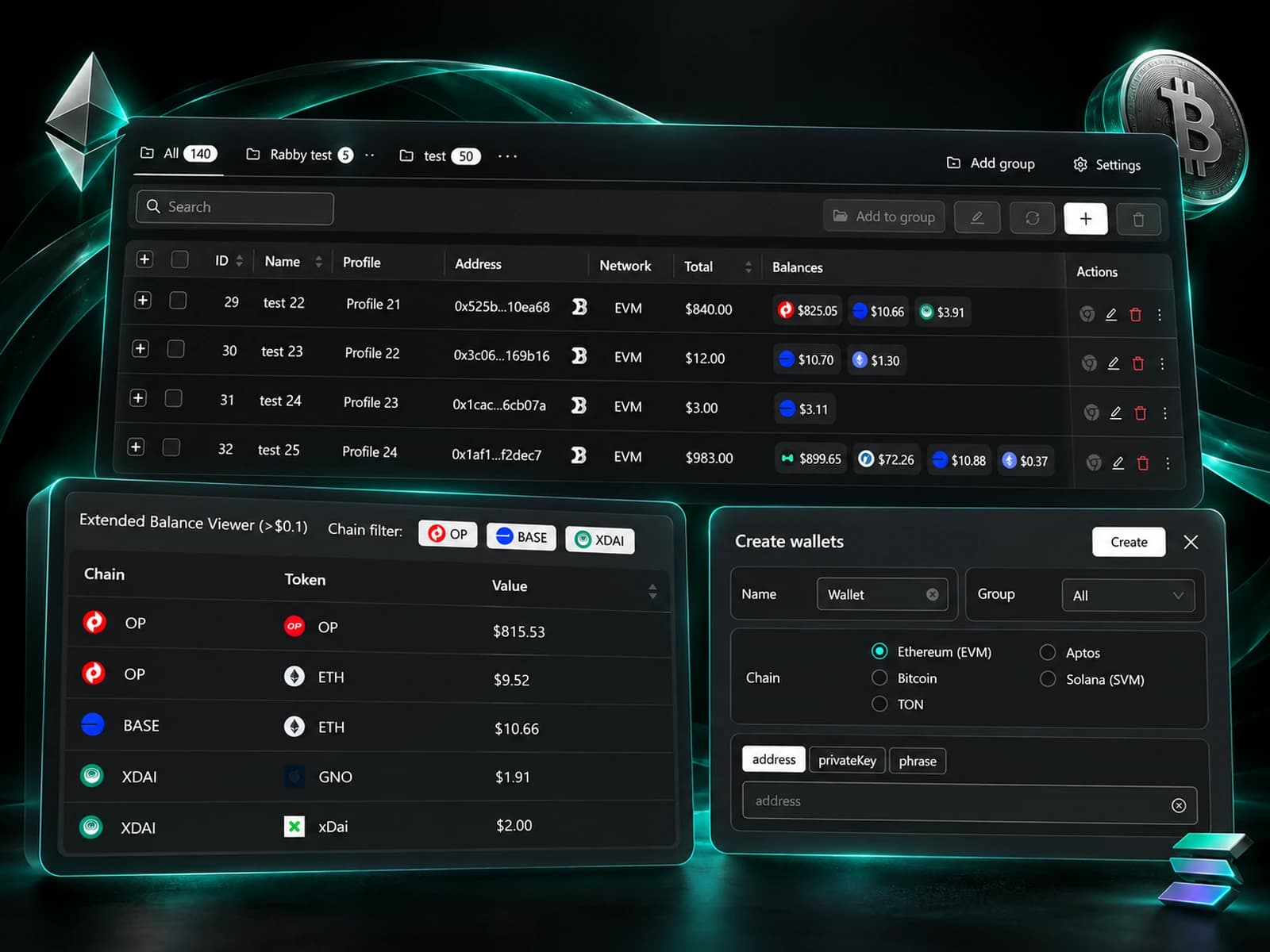
What a wallet manager is and why Web3 needs one
A wallet manager is a home for all your crypto wallets, built into an antidetect browser. In a regular browser every wallet lives in one extension on one device, and any project can tell that a single person stands behind them. On top of that, keys sit in spreadsheets and seed phrases have to be pasted into each extension by hand. Agent-X gives every profile its own wallets and its own isolated browser, so websites see different people while you see one tidy list.
A browser for each set
A profile’s wallets open in a browser with its own fingerprint, so projects can’t tie them to the rest of your wallets.
See who works where
Every wallet shows the profile it’s connected to – no notes, no side spreadsheets.
No more key files
Wallets are stored encrypted inside the app, not in text files sitting on your desktop.
All your wallets in the app within a minute
Paste the wallet list you already have – Agent-X reads it and saves everything in one pass. From there, groups and bulk editing keep things in order.
A key or phrase is enough
Add a private key or a seed phrase – Agent-X restores the rest of the wallet data on its own.
Five networks, one list
EVM, Solana, Bitcoin, Aptos and TON wallets sit side by side, so the one you need is always at hand.
Groups for your projects
Sort wallets into groups, edit dozens of entries together and copy the selection you need to the clipboard.
Several wallets in every profile
One profile can hold wallets from different networks – say, EVM for MetaMask and Solana for Phantom. Connect them while creating a whole batch of profiles or later on, and auto mode gives every new profile the next free wallets.
Extension login without the chores
A connected wallet shows up in MetaMask, Rabby, Phantom or Backpack inside the profile in one click.
Nothing to type
Agent-X fills in seed phrases and extension passwords for you, so keys never wander through the clipboard.
Plans changed – unbind
Take wallets off one profile or a whole selection at once and give them to others.
How much each wallet holds
Run a check on the wallets you pick – and the table fills with amounts in dollars or in the network’s native token. No more opening every wallet in an explorer to find out where your funds are.
Top assets in the table
The largest assets of each wallet are visible in the main list without opening it.
Details when you need them
A breakdown by network and token in USD – with price, amount and the share of each asset.
Empty ones stand out
Wallets without funds are easy to spot, so deciding what to top up and what to set aside takes seconds.

Keys stay on your computer
Private keys and seed phrases are encrypted on your device and never leave it. Only you can open your wallets – with your password.
Nothing in the cloud
Wallets are stored locally and never sync to any server.
Strong encryption
Without your password, encrypted keys are a meaningless jumble of characters.
Locked on every launch
Agent-X asks for your password at startup, so anyone else at your computer won’t see your wallets.
Who needs a Web3 wallet manager
Airdrops and testnets
Each wallet works in its own profile with a separate fingerprint, and extension login takes seconds – so you get through more accounts in the same evening.
Portfolio control
One check shows which wallets hold funds and in which tokens – handy before a withdrawal or a rebalance.
Several networks in one profile
EVM and Solana wallets live in one browser, with MetaMask and Phantom ready to go the moment the profile opens.
Moving from old files
Paste the lists that sat in spreadsheets for years – Agent-X saves the wallets and spreads them across new profiles for you.
Frequently asked questions
Which networks does the Agent-X wallet manager support?
EVM, Solana, Bitcoin, Aptos and TON. Wallets from different networks can be connected to the same profile.
How do I move my wallets to Agent-X quickly?
Paste a list of private keys or seed phrases – Agent-X saves them within a minute and can hand them out to your profiles.
Which extensions does Agent-X log into?
MetaMask, Rabby, Phantom and Backpack. A connected wallet appears in the extension without copying keys or passwords.
Are my private keys sent to Agent-X servers?
No. Wallets are encrypted and stored only on your computer, and only your password opens them.
Is the wallet manager available on the free plan?
Yes. Every feature is in every plan, and the free plan gives 5 profiles forever with the full wallet manager.
Bring order to your wallets
Swap spreadsheets full of keys for one protected list where every wallet has its own browser and opens ready to work.